


More Map Products
 Interactive Image Creator
 Online Google Map Editor
 PowerPoint Maps
iMapBuilder Download Area


 For Windows
 For Mac, Linux or other non-Windows users:
e.g. Nederlands, Français, Deutsch, Portugiesisch, Spanisch , 日本語の , 中文 & العربية
Custom Maps Solution Based on Google Maps
iMapBuilder - map software includes map templates and a full set of mapping features, such as pinpoints and information box support. While iMapBuilder can create attractive maps with our preset of templates, there are still many scenarios Google Maps can show its advantages.
 New! Online Google Map Builder. Try Now (no download required) Try our new Google map editor with street addresses (geocoding) support. Build your own custom Google maps, add points of interest and speech bubbles in just a few clicks.
You may also bulk import addresses from an Excel spreadsheet or a CSV data file to plot points and routes on the custom map automatically.
New! Online Google Map Builder. Try Now (no download required) Try our new Google map editor with street addresses (geocoding) support. Build your own custom Google maps, add points of interest and speech bubbles in just a few clicks.
You may also bulk import addresses from an Excel spreadsheet or a CSV data file to plot points and routes on the custom map automatically. 
 Google Maps is a versatile map tool which combines excellent map data with its intuitive interface, which is familiar around the world. It includes powerful programming interface to allow developers to create sophisticated interactive maps. If you are interested in bringing Google Maps in your website, we have the right solution to satisfy your needs.
Accurate Location Plotting with Longitude and Latitude Values (GPS Coordinates)
iMapBuilder allows you to plot locations visually on our map templates. If you have a set of longitude and latitude values obtained from a GPS device, it would be a pain to plot all of them in approximate locations. We can make use of the Google Maps programming interface to plot the locations in terms of GPS coordinates. If accuracy is utmost to your map, developing a map using Google Maps would be your right choice.
 Address/ Postcode Plotting and Searching (Geocoding)
Currently it is not possible to plot locations by means of addresses or postcodes in iMapBuilder for Windows. Technically, the addresses or postcodes have to be converted to their respective longitude and latitude values before pinpointing on the maps. This is called Geocoding. There are third-party geocoding databases that are able to perform this conversion, but the cost of these databases and the conversion software would be high. Google Maps includes geocoding function, and our Google Map Editor has adapted the same function, which is free and accurate. Therefore, if you have a list of bank branches with address or ZIP code information to visualize on the map, creating a map using Google Maps would deem suitable. It is even possible to add a search box to your map to find the corresponding postcode locations, so your client can simply enter his ZIP code location to search for bank service coverage.
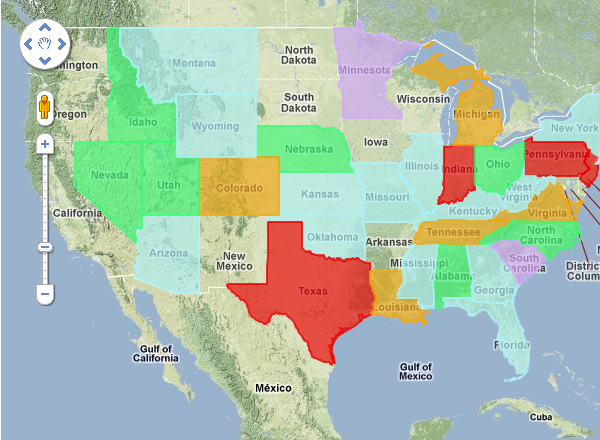 Overlay with Custom Regions, Administrative Divisions and More
A plain Google Maps include boundaries for states, provinces and similar administrative divisions. It is not easy to show your own regions, give it some colors and controlled by data. We can help creating overlays on Google Maps, so that you can give colors to states, provinces and even ZIP code/postcode areas. Then color and the borders of the overlays can be governed by data from your database. Creating a sales map or coverage maps based on minute geographical data can be achieved like this.
Heat Map
 To measure how your data varies by geography, we would recommend creating heat maps. Heat Map uses a color progression or gradients to depict data per area on the map. iMapBuilder for Windows already supports the creation of heat map by means of administrative divisions, and we can also make use of Google Maps to create other heat maps. They can be similar to overlay maps, or they can be based on exact dots to show the crowdedness of your data. Heat map is useful for data analysis, and an easy way to provide backup of your business decisions. With different data sources, we can also pool them onto one map as different layers for comparison, and to create historical, timeline maps.
Plotting Routes, Find Distance and Provide Driving Directions
 It is common to create coverage maps, based on a search location or an address to show all possible pinpoints with a certain radius. You may even need to find the distance from one point to another, and list out the driving directions between them. We can make use of Google Maps to create routes. They can be direct routes or following the streets and distance can be measured. All plotting is automatic and dynamic, so you can change your starting destination and give you different results. Our Google Map Editor supports creation of lines and routes, and it can also create geodesic curves which is useful for creating flight routes.
Street Level Maps and Street View Support
iMapBuilder supports map up to the US county level. If your map has to zoom into the streets, maps developed on Google Maps would come to your usage. We can leverage the zoom function on Google Maps to provide street level maps. This opens up a lot of possibilities for your maps, such as drive maps showing the route to major landmarks, or nearest highway exit to your store. We can also include Street View for locations, so that the actual view of your designated locations can be visualized. If you are doing a realtor map, you can even show the photo of the property in Street View directly.
 Database-driven content
If you have a database or Excel file with location-based information to be shown, Google Maps would be the best choice. We can create program to read in your current database or convert your Excel data, and display all of the locations on the map. Location information can be either geocoded from addresses or ZIP code values, and the information for each place can be filled in using pinpoints and information boxes from Google. Both text and images are supported and we can even place media files if you wish.
Map-based Editing Interface
A dedicated editing system can be created by using Google Maps and you can add different annotations to the map directly. You would no longer need to find the GPS coordinates or the place names, by simply drag and pan you can zoom into the area you want to annotate easily, and you can add pinpoints and text/images to the map. All these information are stored in a database and you can recall your own map by using a direct link. This link can also be made for embedding your own annotated map to your websites, blogs or discussion forums for presentational purpose. We also make custom-made systems so that the map can be tailored to fit different requests.
