


GMap Editor v1 User Guide > Tutorial > Create Map
Get Started with iMapBuilder Online
The Start Wizard is displayed when you login.
You can create New Map Project,
or open your existing saved map project from the drop down box.
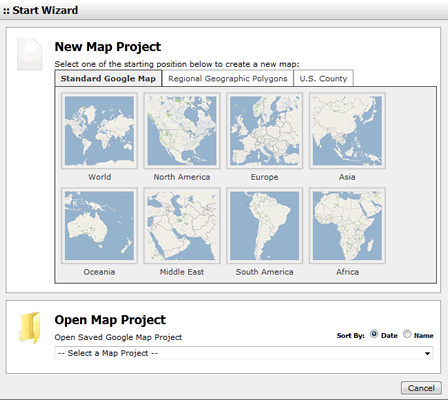
Start Wizard - Create a map or Load existing map project.
We also provide Geographical Area Polygon overlay now, currently available geographical areas include World countries, Continents, United States & U.S. counties etc.
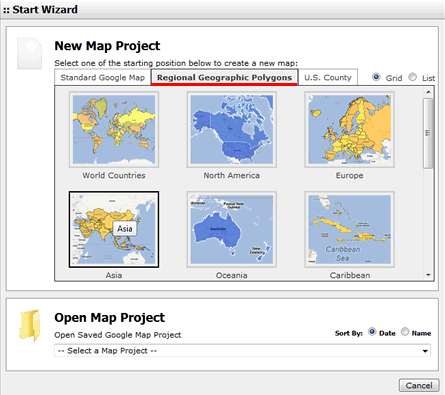
Click the highlighted tab, it would list available geographical area polygon maps.
Setup geographical area polygons properties before creating a new map.
| Options | Description |
| Stoke Weight | The stroke width can be change to be thinner or thicker. |
| Stoke Opacity | Change the opacity to prevent other word/image from being covered. |
| Stoke Color | Change colors from a color picker with pantone no. |
| Fill Opacity | Change color opacity of the selected area. |
| Fill Color | Change color of the selected area. |
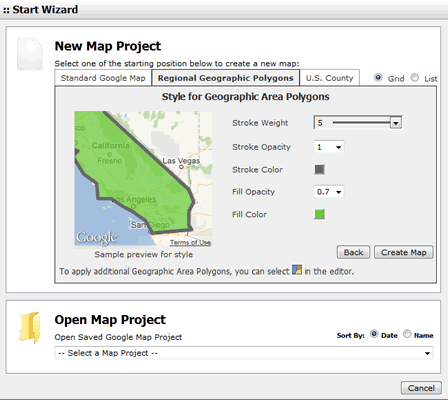
Setup polygons properties and preview polygons.
[ Top of Page ]