iMap Online - Interactive Image Mapper

Create, save, open & edit map within browser online without downloading program
Embed interactive Flash map to your website now

No installation -- No download -- Runs directly in your Browser!

Loading
iMap online, map editor ,interactive map maker within browser, on-line map application, web based mapping tool, embed map to website

Getting Started

Embed your interactive map into Blogger/Blogspot

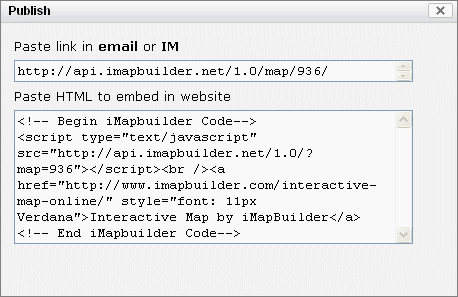
iMapBuilder Online provides the link to the map that could be shared. Also you can embed the code that iMapBuilder provides in any Web site. Here is the instruction to embed iMap into Blogger/Blogspot:

  1. Click . The Publish dialog displays the link and the HTML code.


  2. Copy the embed code.

  3. Click to close the Publish dialog.

  4. Log into your Blogger / Blogspot blog. Go to the 'Edit Posts' area.

    Log into your Blogger / Blogspot blog

  5.  Click Edit to enter the edit panel.

    Click Edit to enter the edit panel of blogger

  6. With the Edit HTML tab pressed, paste in your embed code generated by iMapBuilder. Click 'Publish Post' button.


    paste the embed code of map into blogger

  7. You will see a message 'Your blog post published successfully!'. Click 'View Post' to continue.

    interactive map is published successfully in blogger

  8. The interactive map is now embedded into the Blogger.

    The interactive map is now embedded into the Blogger

    Related resources:

    Embed your interactive map into Yahoo! SiteBuilder

    Embed your interactive map into Drupal

    Embed your interactive map into WordPress Blog

    Embed your interactive map into Joomla

    Embed your interactive map into Microsoft Expression Web


    If you have a FTP hosting server, you may try our iMapBuilder for Window software.