


iMapBuilder - Interactive Map Software


Help Topics:
Getting Started
- Installation guide
- Interface Introduction
- Create an interactive map
- Map properties
- Styles and color theme
- Tooltip
Draw on map
- Add marker
- Draw line
- Draw route
- Add label
- Add clickable area
- Insert image or add logo
- Edit multiple objects
Software Features
- Area color and link settings
- Create heat map
- Map with legend
- Category filter for markers
- Highlight and group areas
- Import city to an interactive map
- Pan and zoom function
- Default zoom level and center point
- Batch edit region settings
Publish to the web
Embed map into blog or CMS
Plot latitude and longitude
Example of use
- Create population density heat map
- Clickable image map
- Create a drill down map
- Create World map
- Create U.S. map
License and registration
Map with legend

A map legend is the little box at the corner, which lists the colors or symbols used and help users to understand the meaning of what the map represents. It is especially useful for describing data range in a heat map.
- Click
the
legend button on sidebar.

Click add to add a legend item by specifying color and description, or import from regions/ lines/ color list automatically.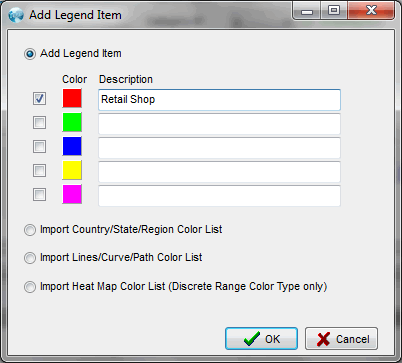
- The color, description, layout, key and text can then be specified. Click update and apply to save the settings.
- Instead of the using rectangular key, colored
lines can also be used.

Note: We can try iMapBulider HTML5 to create responsive maps which can be viewed in mobile and tablet.